Aurora, a local statistics engine

Cloud LLMs guess. Aurora computes.

Drop in a dataset. Aurora runs real statistical methods on your own machine, cites every finding, and when a method can't run, it tells you why instead of faking a result.

Critconf 1.00

Anomaly in precip_mm at row 47

precip_mm |z| = 10.9, temperature_c |z| = 0.5, surfaced for review.

method iso-forest + robust-zclaim ANOM-0000
cites Chandola, Banerjee & Kumar (2009), Anomaly detection: a survey, ACM Computing Surveys

11cited findings 3critical 0fabricated

A finding card from the desktop app, redrawn. Tally: the factory bearing demo, about 10 s on a laptop.

A statistics engine that shows its work.

For analysts, engineers, scientists and quants who want real statistics on their data, and for AI builders who want their agents to compute instead of guess.

  • Computes, doesn't guess.

    Real methods produce the numbers: anomaly detection, regimes, forecasting, physics-law discovery. No language model is asked for its best guess at a z-score.

  • Every finding is cited.

    Each one names the method and threshold behind it and links its source. The write-up carries a "0 fabricated" check.

  • Same answer every run.

    Same data and settings give the same result, with a trace of exactly which method produced it.

"semantically identical questions return different numbers."

Overheard on r/dataengineering

A CSV at four. The question at five.

What happens between the two, in five steps. These are the app's real screens. The orb acts them out as you scroll.

  1. Drop the data

    It reads the shape first.

    CSV, Parquet, JSON or XLSX. Aurora profiles the time axis, gaps and duplicates, then runs only the methods that are valid for that shape. You don't pick methods.

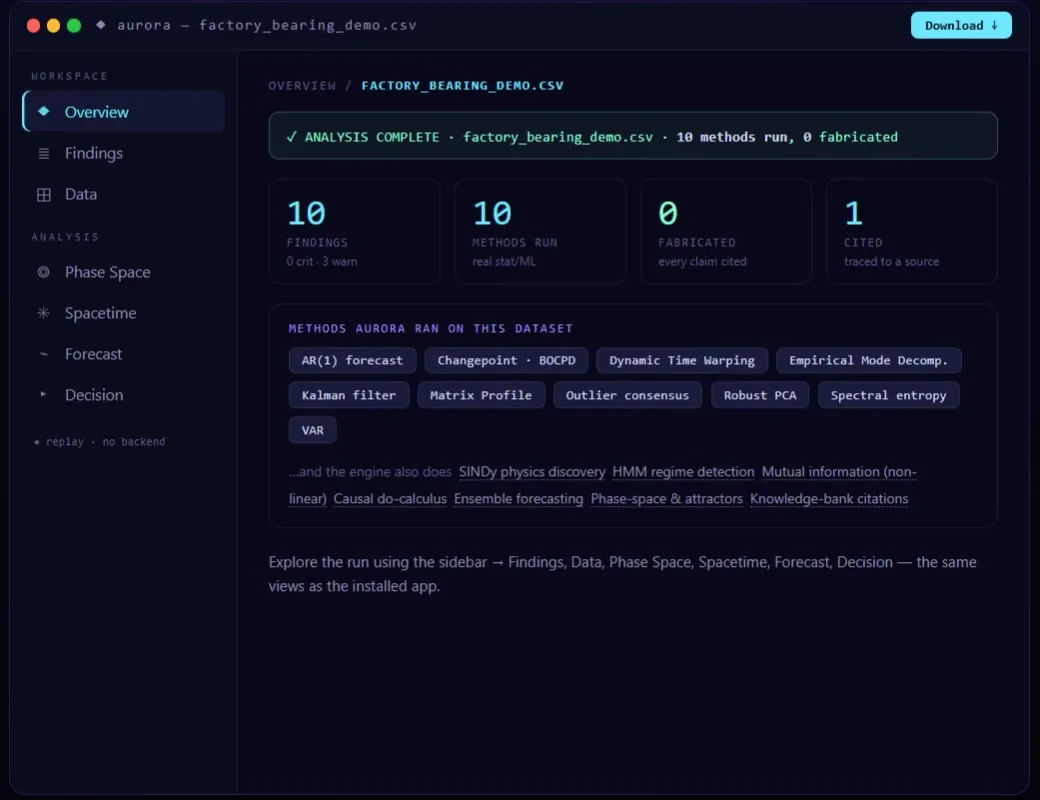
    Aurora's web demo, Overview of factory_bearing_demo.csv: analysis complete, 10 methods run, 0 fabricated, with the list of methods Aurora ran on this dataset.
    The web demo replaying factory_bearing_demo.csv: 10 methods run, 0 fabricated.
  2. Run real methods

    Two detectors have to agree.

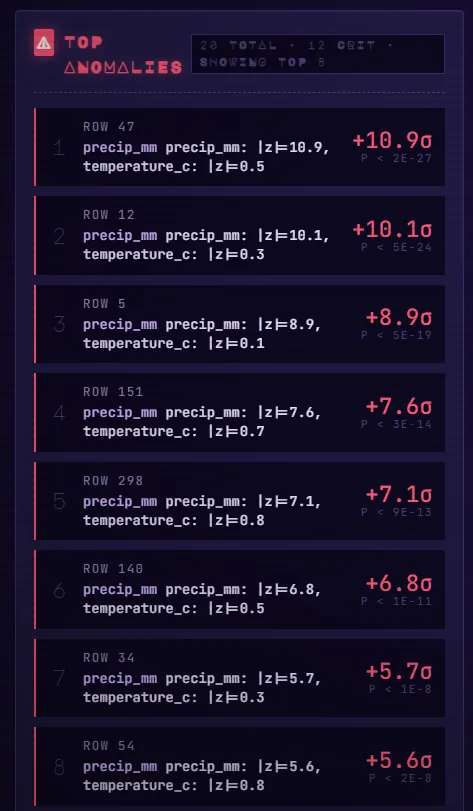
    Anomalies are flagged by consensus, so one jumpy detector can't raise an alarm alone. In a 5,000-row test, 325 points cleared that bar. Regimes come from a hidden Markov model, change points from PELT, and forecasters compete on a held-out fold.

    Aurora's Anomalies lens: the top anomalies by row, each with its z-scores and p-value.
    The Anomalies lens, ranked by how far each row sits from normal.
  3. Cite every line

    Every card shows its receipt.

    Each finding carries its method, threshold, claim id and reference. The local model only rewords knowledge it retrieved, and a verifier checks each sentence against its source and flags anything that doesn't trace back.

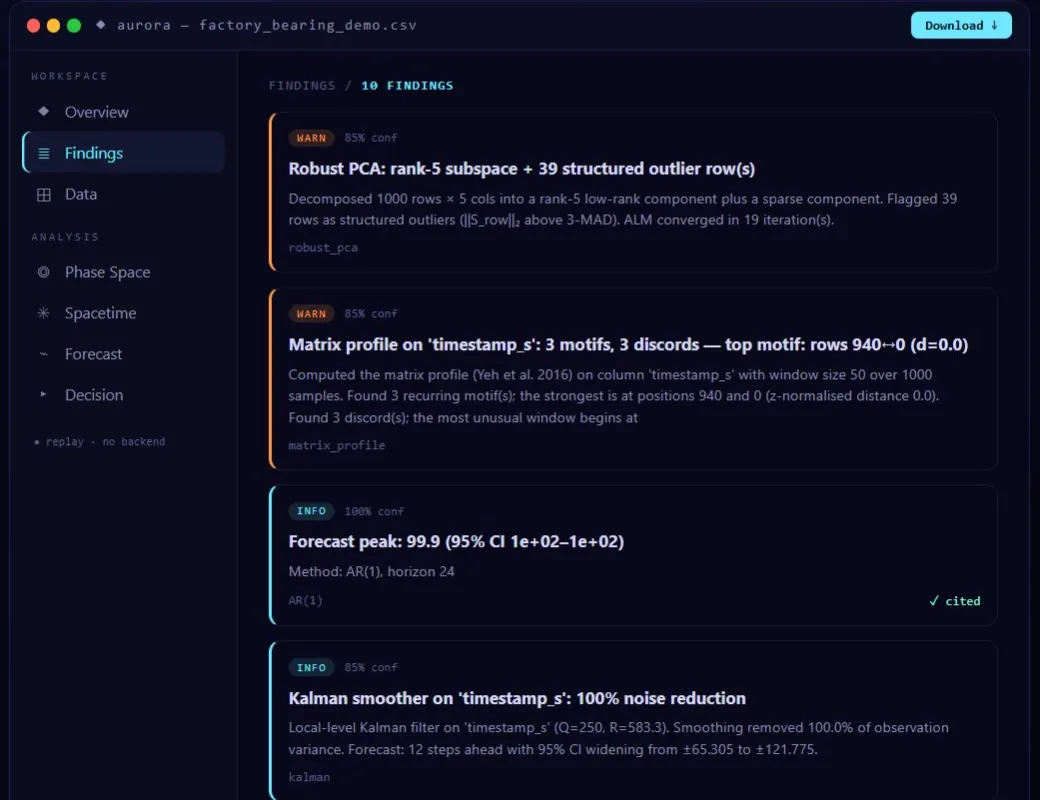
    Aurora's Findings view: Robust PCA flagged 39 structured outlier rows, a matrix profile found 3 motifs and 3 discords, an AR(1) forecast and a Kalman smoother, each card naming its method.
    Findings: every card ends with the method that produced it.
  4. Say what didn't run

    A skipped method says so.

    A method that can't run is skipped with a stated reason, never quietly faked. From a real run:

    Gaussian process analysis exceeded the 90-second per-method time budget on this dataset and was deferred.run narrative, climate_buoy_demo.csv

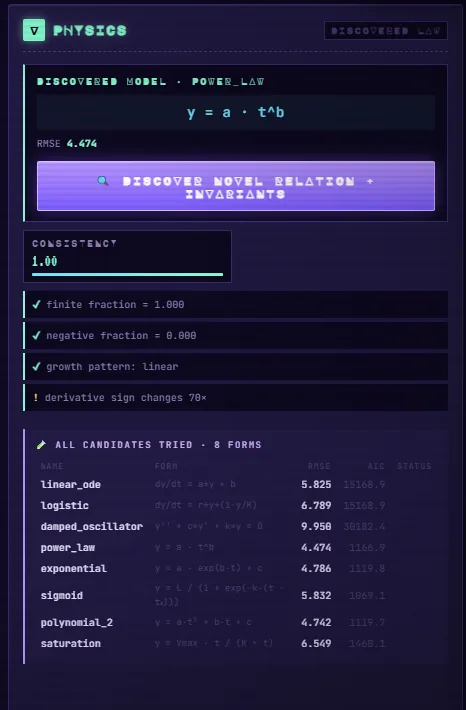
    Aurora's Physics lens: the discovered model, its RMSE, the consistency checks, and every candidate law it tried with its fit.
    Physics: every candidate law it tried, with the fit for each, not only the winner.
  5. Seal the result

    Hand it on, and it can be checked.

    Every run exports a portable .aurora.json bundle with a SHA-256 content hash and an optional Ed25519 signature. Load it on another machine and it verifies, or it raises if anything was changed.

    import aurora_sdk as aurora
    r = aurora.run("data.csv", depth="standard")
    r.bundle.save("audit.aurora.json")   # SHA-256 + optional Ed25519
    
    b = aurora.Bundle.load("audit.aurora.json")
    b.verify()                           # raises if tampered

Measured, not guessed.

Real runs, timed locally. The datasets ship with Aurora or are public, so you can rerun them.

Run the factory demo

RunResultTime
Factory bearing demo11 cited findings, 3 critical~10 s
Air quality, 9,357 rows12 cited knowledge entries, 0 fabricated~14 s
5,000-row outlier test325 points flagged by two or more detectors
Rediscover the Lawderives y = ½·a·t² from a video of a falling ball, with SINDy

One dataset, six ways of looking.

Every lens is built from named methods you can inspect. Plain English on top, the math one click down.

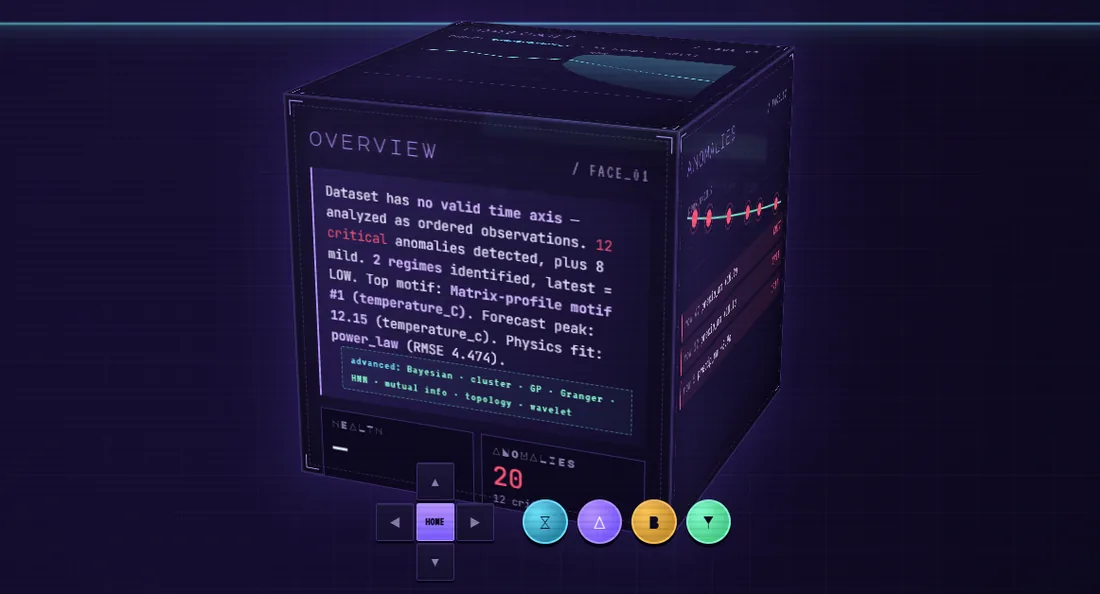
  • The Overview lens: the dataset's shape in a sentence, what ran, and what was skipped.

    Overview

    The shape of your data, what ran, what was skipped, and the headline results.

  • The Anomalies lens: top anomalies by row.

    Anomalies

    Flagged when two of three detectors agree: robust Mahalanobis, isolation forest, LOF.

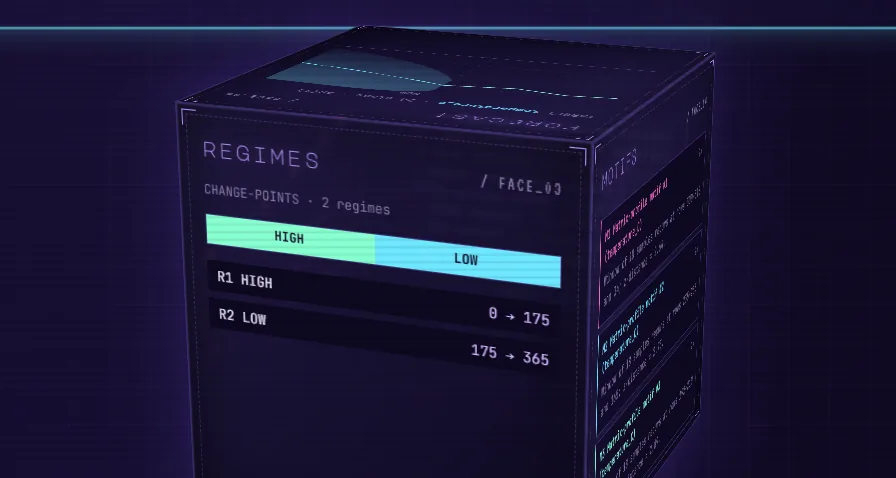
  • The Regimes lens: change points and two regimes, high and low, with their row ranges.

    Regimes

    Hidden Markov states with dwell times, plus PELT change points for when the system itself changed.

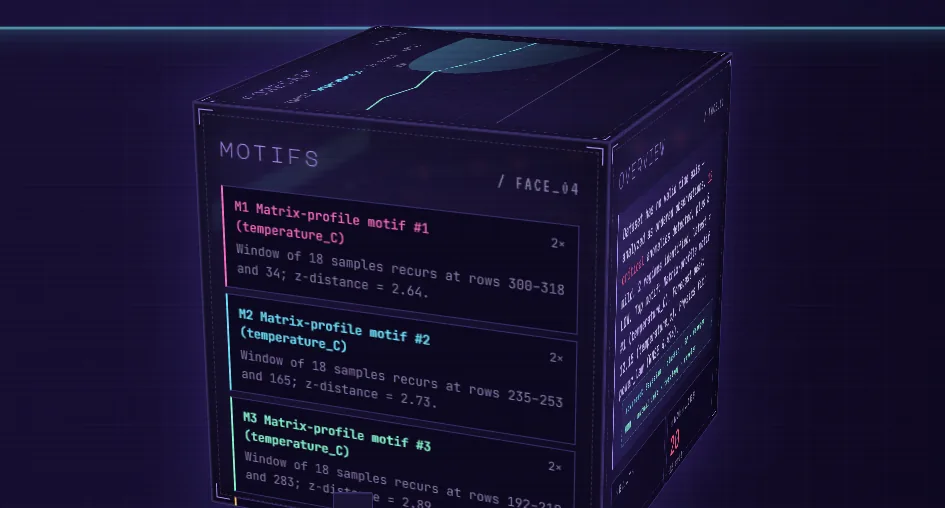
  • The Motifs lens: matrix-profile motifs with the rows where each recurs and its z-distance.

    Motifs

    Repeating windows and discords from the matrix profile, plus persistent homology.

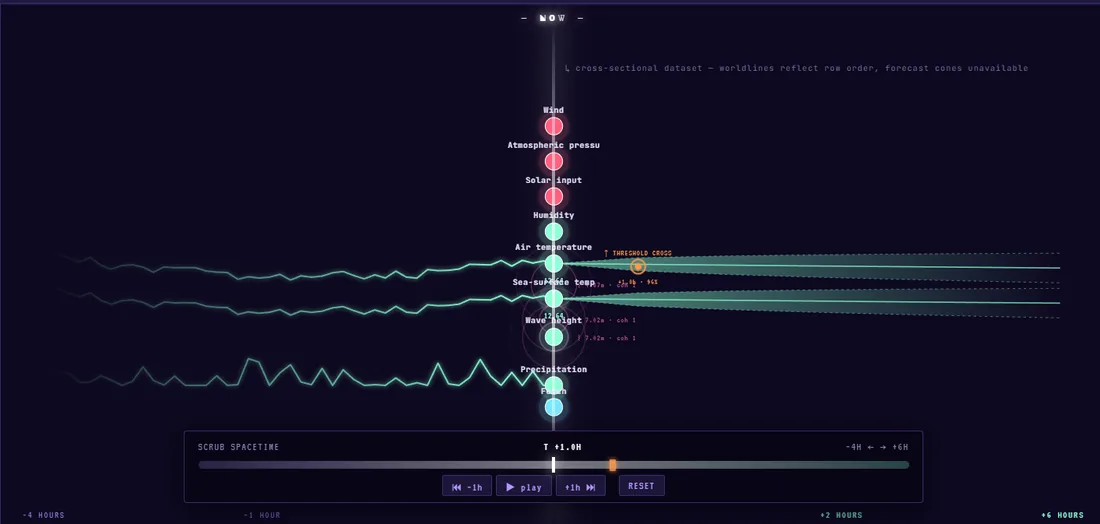
  • The Forecast lens: series scrubbed through time with widening forecast bands.

    Forecast

    AR(1), kNN-window and exponential smoothing compete on a held-out fold. The winner is named, with its interval.

  • The Physics lens: the discovered law and every candidate it tried.

    Physics

    SINDy fits sparse governing equations and checks them against known laws.

Let your agent compute instead of guess.

One command fetches aurora-mcp from PyPI for Claude Desktop, Claude Code, Cursor or any MCP client. It's also in the official MCP Registry as io.github.FantasyLab-ai/aurora.

Aurora's polar bear peeking over the terminal.
uvx aurora-mcp --list-tools

add to your agent config

{
  "mcpServers": {
    "aurora": {
      "command": "uvx",
      "args": ["aurora-mcp", "--allow-root", "/path/to/your/data"]
    }
  }
}

the 7 tools

They only read paths you allow, cap their output and return JSON.

  • aurora_analyzeRun the analysis on a CSV, TSV, Parquet or XLSX file and return cited findings.
  • aurora_findingsList findings with severity, the exact method and threshold, and a claim id.
  • aurora_explainThe receipt for one finding: computed values, assumptions, references.
  • aurora_forecastA forecast fitted on the data, with the method disclosed.
  • aurora_simulateStep the system forward. It pauses when intervals get too wide.
  • aurora_interveneWhat-if: perturb one variable and propagate it through the discovered model.
  • aurora_load_bundleLoad a shared .aurora.json and verify it before trusting it.

SDK and MCP docs on GitHub

Your data stays on your machine.

  • Offline after first launch.First launch seeds a small knowledge bank (about 50 MB). After that it needs no API keys and no cloud, and it sends no telemetry. The analysis server listens on 127.0.0.1.
  • Read every line.The engine, the desktop app, the SDK and the MCP server are open source under Apache-2.0 at github.com/FantasyLab-ai/aurora.
  • Sharing is opt-in, one finding at a time.Hit Share on a finding and only its text, method and dataset name go to the community feed. Raw rows never leave your machine, and shares expire after 90 days.

Not done yet

The desktop app isn't code-signed yet, so Windows SmartScreen and macOS Gatekeeper will warn on first launch.

On Windows: More info, then Run anyway. On macOS: right-click the app, then Open.

The hosted knowledge-base packs aren't published yet.

Two ways in. Both free.

The installer if you'd rather not touch a terminal. The source if you'd rather read it first. The agent route is above.

  1. The desktop app

    no Python, no terminal

    Download the installer for your OS, double-click, and drop a CSV on the window. The analysis engine is bundled inside.

    Download the latest release

    • Windows 10/11Aurora_x.x.x_x64-setup.exe, or the .msi
    • macOS (Apple Silicon)Aurora_x.x.x_aarch64.dmg
    • Linux.deb (Debian, Ubuntu, Mint) or .rpm (Fedora, RHEL, openSUSE)
  2. From source

    Python 3.10+

    Run the Studio locally, then open http://127.0.0.1:8000 and try a demo or drop your own CSV, Parquet, JSON or XLSX.

    git clone https://github.com/FantasyLab-ai/aurora.git
    cd aurora
    python -m venv .venv
    source .venv/bin/activate   # Windows: .venv\Scripts\activate
    pip install -r requirements.txt
    python studio_api.py
    pip install cryptography   # Ed25519 bundle signing
    pip install mcp            # MCP server for LLM agents

Lab notes you can rerun.

What the methods found, what they refused to conclude, and the command to rerun it yourself.

All lab notes · RSS

2026-07-29 · 8 min read

The method that didn't run

A climate buoy dataset, 20 cited findings, and a Gaussian process regression that hit its 90 second budget, gave up, and said so.

Read the experiment

Findings people chose to share

Shared straight from the app. There's no telemetry, so this feed is the only way we know anyone's using it.

  • …
    Loading the feed.

live from aurora-community.fantasy-labai.workers.dev/feed

Run it on your own data.

Free and open source. Try the demo in your browser first if you'd like.

Aurora's polar bear holding a lantern with a small aurora inside it.